
 Pricing
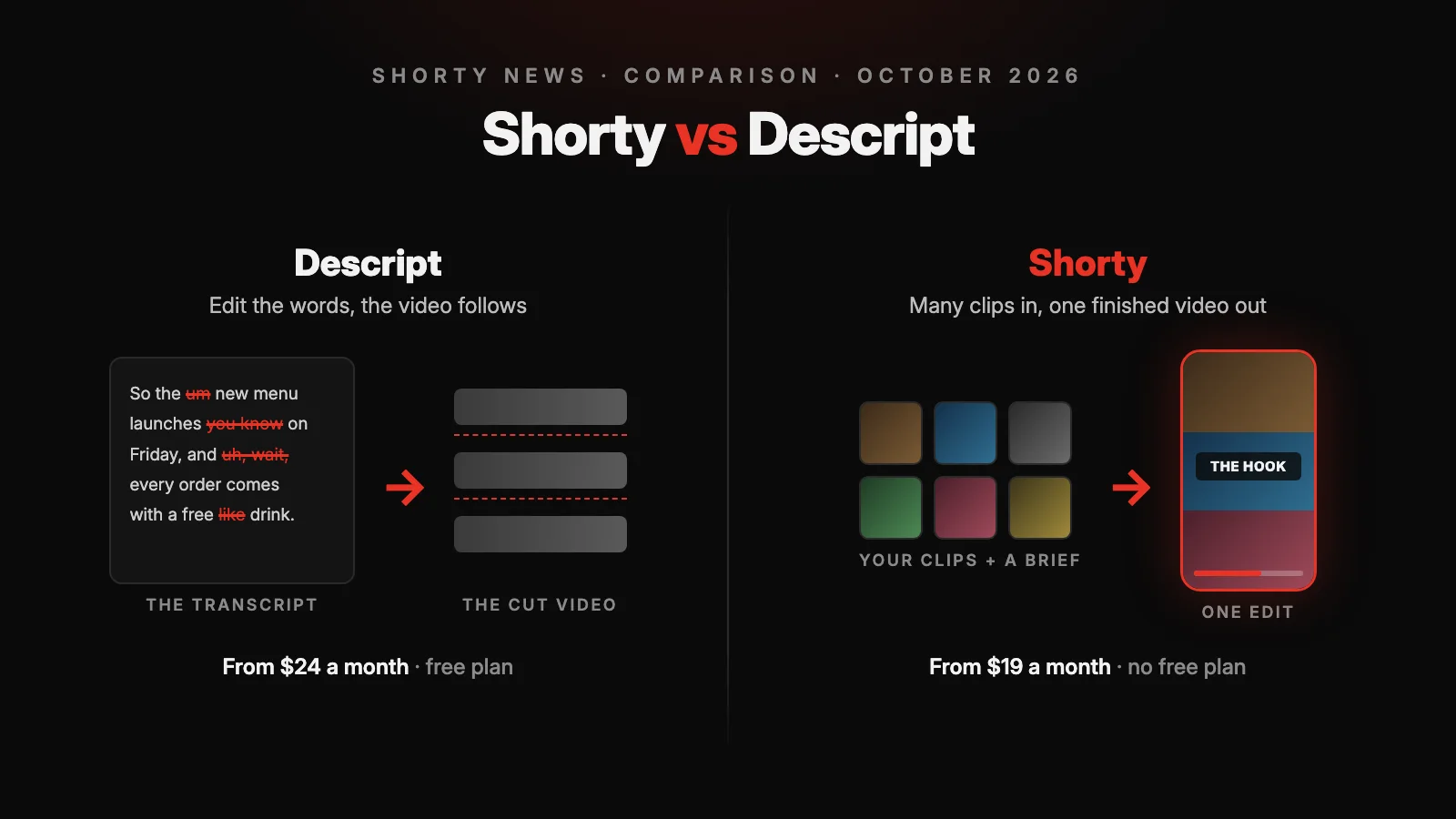
Shorty is an AI video editor that turns your own clips into a finished short video from a written brief or a video you want to copy. Descript is a video and podcast editor where you edit by editing the transcript, with Underlord, an AI co-editor, to carry out instructions. There is no single best one. There is a best one per job: Descript for podcasts, interviews and long talking-head recordings you want to edit word by word, Shorty for Reels, TikToks and Shorts made from several clips, especially when you have a reference. Paid plans start at $19 a month on Shorty ($13 billed annually) and $24 on Descript ($16 billed annually), and Descript also has a free plan.
What Is the Difference Between Shorty and Descript?
Shorty starts from the video you want. You add clips or photos, then describe the result or upload a reference, and Shorty plans the cut, picks the shots, adds captions, music and effects, and renders an MP4. You change it by asking: select a title or a moment in the preview and say what should happen.
Descript starts from your recording. It transcribes what you upload or record, and you cut the video by deleting words in the script. Around that sit Underlord, which carries out editing instructions, and AI tools such as Studio Sound, Remove Filler Words, Eye Contact, Green Screen and Create Clips.
Both reach past their core. Shorty removes filler words and narrates with an AI voiceover; Underlord can write a script and turn slides or a blog post into a video. The difference is where each one is strongest.
This comparison is published by Shorty. Descript’s side comes from its own pricing page, help center and product pages, checked on 25 October 2026. There are no affiliate links.
Shorty and Descript, Feature by Feature
| Task | Shorty | Descript |
|---|---|---|
| Where you start | Your clips or photos, plus a written brief or a reference video to copy | A recording you upload or make in Descript, edited through its transcript |
| Editing by instruction | The brief, then revisions: select a title, object or moment and describe the change | Underlord in the app, or Descript’s MCP from Claude, ChatGPT or Cursor |
| Editing what was said | Ask in the brief or a revision; ums, stutters and false starts go in one prompt | Delete words in the transcript; Remove Filler Words and retake removal |
| Copying a video’s style | Upload it as a reference: Shorty follows its pacing, shot structure, text and color | No reference upload described; describe the style to Underlord or apply a layout pack |
| Footage | Up to 150 clips or photos and 8 GB per edit, from uploads, Google Drive, Dropbox or a dropped folder; Pixabay stock | Upload, or record your screen, webcam or remote guests in Rooms; media hours metered by plan; stock library on Creator |
| Sound | Your own track or suggested music, sound effects, noise reduction and loudness levelling in the edit; AI voiceover and voice changer | Studio Sound, AI speech with voice clones, stock music on Creator |
| Captions | Designed for each edit; SRT or VTT download | Captions and layouts; SRT or VTT export with speaker labels |
| Another language | Captions follow the language spoken; translation and dubbing are not Shorty features | Translated captions in 67 languages (uses AI credits); dubbing, and translation with proofread on Business |
| From an AI assistant | Shorty MCP, and the full editor inside ChatGPT with Shorty Studio | Descript MCP: import, Underlord edits, publish links, transcript and timeline exports |
| Export | MP4 in seven vertical, square and wide formats; write “4K” for a 4K delivery | 720p with a watermark on Free, 1080p on Hobbyist, 4K from Creator; EDL, AAF, FCPXML, Premiere and Resolve timelines |
| Plans | Creator $19, Pro $49, Studio $99, Max $199 a month; 30% off billed annually | Free; Hobbyist $24, Creator $35, Business $65 a month, or $16, $24 and $50 billed annually |
Sources: Descript pricing · Descript Underlord · Descript MCP · Descript translated captions · Descript subtitle export · Shorty pricing.
How Does Editing Work on Each Platform?
On Shorty, you choose how to direct the edit. A brief can be one sentence or a paragraph: the length, the hook, where the product shows up, the captions you want or don’t. A reference is a video you like, uploaded or picked from Discovery, and Shorty rebuilds its rhythm, shot order, text and color with your own footage. You can use both in the same edit.
Shorty then watches every clip, picks the moments, cuts them to the music, reframes them for the format, and adds captions, titles and sound effects. The finished edit opens in a preview. Click the title and write “make it red”, or ask for a darker grade, a shorter hook or more clips, and Shorty makes a new version without starting over.
On Descript, you start from the transcript. Delete a sentence and the video loses it; drag a clip onto a line and it plays there. Underlord takes instructions on top of that, and Descript’s own examples include trimming to a target length around a topic, adding zooms to hide jump cuts and adding lower thirds. Create Clips asks Underlord for the most shareable moments of a long recording.
Descript leaves you in a project you can keep editing by hand. Shorty hands you a rendered video and keeps the changes in the conversation.
How the Editing Compares
| Criteria | Shorty | Descript |
|---|---|---|
| What the AI works from | Every clip’s pictures and sound, the brief, and the reference if you add one | The transcript and the video in your project |
| Your first result | A rendered edit with captions, music and effects | Your project, edited by you or by Underlord |
| Changing a sentence | Ask for it in a revision | Edit the transcript |
| Changing a title or a moment | Select it in the preview and describe the change | Edit it on the canvas or timeline, or ask Underlord |
| Many videos at once | Batches of 4 to 50 videos, by plan | No batch of separate videos described; Underlord repeats an edit inside a project |
| Main limitation | No timeline for frame-exact trims, masks or keyframes: finish the MP4 in another editor | Transcript editing needs speech; clips with no talking are edited on the timeline |
How Do You Make the Same Video on Each Platform?
The task: a 30-second vertical video for Reels and TikTok, made from your own footage: one three-minute talking-to-camera take and five 20-second B-roll clips of the product, with captions and music. Then one change to the finished video, and a subtitle file.
| Step | Shorty | Descript |
|---|---|---|
| Footage | Drop the six clips in, from your computer, Google Drive or Dropbox | Upload them into a project: 4 min 40 s of media time |
| Direction | Write the brief, for example “30 seconds, hook in the first line, B-roll over every product mention”, or upload a reference | Transcribe, then ask Underlord for a 30-second cut, or delete words in the script yourself |
| Clean speech | Add “remove the ums” to the brief | Remove Filler Words, then Studio Sound |
| Vertical frame | Choose 9:16; Shorty reframes every shot | Set the composition to 9:16 and choose a layout |
| B-roll | Placed from the brief or the reference | Drag clips onto the script or timeline, or ask Underlord |
| Captions and music | Arrive with the edit, with sound effects | Add captions and a layout; pick music from the stock library on Creator |
| One change | Select the hook title and write “shorter, and in red” | Edit the text yourself, or ask Underlord |
| Subtitle file | Subtitles → Download SRT | Export → Subtitles → SRT or VTT |
| Export | MP4; write “4K” for a 4K version | 1080p on Hobbyist, 4K on Creator |
Which One Gets There Faster?
Shorty gets from six clips to a finished vertical edit in fewer steps, and the B-roll, captions and music arrive already placed. Descript gives you more direct control over what is said, and the project stays open for hand edits afterwards. If your video is mostly one person talking, Descript’s transcript is the quickest way to tighten it. If it is several clips that need a story, Shorty does more of the work.
Steps are based on each product’s documentation and help pages, checked October 2026.
How Much Does the Same Video Cost?
Neither product publishes a fixed price for an AI edit. Shorty publishes what an edit uses on average and shows the estimate before you start. Descript publishes the most two of its audio tools can cost, and says Underlord has no fixed price per action. So these are the published numbers, not a bill. Plans used for the estimate, monthly billing:
| Criteria | Shorty Creator | Descript Hobbyist | Descript Creator |
|---|---|---|---|
| Price | $19 a month | $24 a month | $35 a month |
| Allowance | 4,400 credits | 400 AI credits and 10 media hours | 800 AI credits and 30 media hours |
| Cost per credit | ≈$0.0043 | ≈$0.06 | ≈$0.044 |
| Also included | Every editing tool, effect and caption style | 1080p export and Underlord | 4K export, stock media and top-ups |
One Video, One Change and a Subtitle File
| Step | Shorty Creator | Descript Hobbyist |
|---|---|---|
| Footage, 4 min 40 s | No separate allowance; more footage raises the edit’s credits | 4.7 of 600 media minutes |
| The edit | About 500 credits on Auto (≈$2.16), or about 100 on GPT 6 Luna (≈$0.43); more with lots of footage or a reference | By hand in the transcript: no AI credits. With Underlord: not published; every message and tool it runs uses credits |
| Remove filler words | Part of the edit | Up to 30 credits (≤$1.80) |
| Clean up the sound | Part of the edit | Studio Sound, up to 30 credits (≤$1.80) |
| One change | Uses credits; Shorty shows the estimate before it runs | By hand: no AI credits. With Underlord: not published |
| Subtitle file | No separate charge listed | No separate charge listed |
| Total | From ≈$2.16 on Auto or ≈$0.43 on GPT 6 Luna, plus the change | Up to ≈$3.60 for the two audio tools, plus any Underlord use |
A Series of 10 Videos
Most people make more than one. Here is a month of ten videos like this one.
| Criteria | Shorty | Descript |
|---|---|---|
| Media | No separate allowance | 47 of 600 media minutes on Hobbyist |
| Edits | About 5,000 credits on Auto: more than Creator’s 4,400, inside Pro’s 12,600 ($49). About 1,000 on GPT 6 Luna, inside Creator | By hand: no AI credits. With Underlord: not published |
| Audio tools | Part of each edit | Up to 600 credits: more than Hobbyist’s 400, inside Creator’s 800 ($35) |
| Plan that fits | Creator on GPT 6 Luna, Pro on Auto | Hobbyist if you edit by hand, Creator with the audio tools on every video |
Sources: Descript pricing · Descript media minutes and AI credits · Descript top-ups · Shorty pricing · What a Shorty edit costs.
Retries, Top-Ups and Leftovers
AI edits sometimes take another try, so plan for revisions. On Shorty, a revision uses credits and a failed edit returns its credits. On Descript, edits you make by hand in the transcript use no AI credits, so the more you edit yourself, the less you spend; Underlord work is billed for both its reasoning and the tools it runs.
When you run out, Descript sells top-ups on Creator and Business only: 350 AI credits for $35, 1,000 for $80 or 4,000 for $200, and media in blocks of 5 hours for $25 to 50 hours for $150. Top-ups last up to a year and are not refundable. Descript’s monthly allowances don’t roll over. On Shorty, a bigger plan starts the day you switch and its credits are added on top of yours.
Prices were checked on 25 October 2026 on Descript’s pricing page and help center and on Shorty’s pricing page, at monthly rates. Credit costs that depend on a model’s work are shown in each app before you run them.
Which Should You Choose: Shorty or Descript?
There is no single best choice between Shorty and Descript. There is a best one per job.
| Your main task | Better fit | Why |
|---|---|---|
| A podcast, interview or long talking-head recording | Descript | Edit by deleting words, Studio Sound, Rooms for remote guests, up to 30 media hours on Creator |
| Reels, TikToks or Shorts from several clips | Shorty | Plans the cut across all your clips and renders it with captions, music and effects |
| Recreating a video you admire with your own footage | Shorty | Upload it as the reference; Shorty follows its pacing, shots, text and color |
| One video in many languages | Descript | Translated captions in 67 languages; dubbing on Business |
| Many short videos every week | Shorty | Batches of 4 to 50 videos; about 44 GPT 6 Luna edits a month on Creator |
| Editing from Claude or ChatGPT | Both | Descript’s MCP; Shorty’s MCP and Shorty Studio inside ChatGPT |
Choosing for Your Kind of Video
Long recordings. If you publish podcasts, interviews, courses or webinars, Descript is the stronger tool: record, transcribe, cut by deleting words, clean the sound and export a timeline for another editor. Shorty can cut a talking head too, but it is built for short videos, not a 40-minute episode.
Short-form from your own clips. If you shoot on your phone and need a Reel, TikTok or Short out of it, Shorty does the part Descript leaves to you: choosing shots across many clips, putting B-roll in place and timing captions and music. You review a finished video instead of building one.
A style you want to copy. If you already know what the video should feel like because you have seen it, upload it to Shorty as the reference. Descript works from instructions and templates rather than a video to copy.
Switching. Projects don’t move between the two, only rendered video. Moving to Shorty, export an edit you liked from Descript and upload it as the reference, so your next video keeps the style. Moving to Descript, upload your clips and transcribe them. You can also use both: clean up a podcast in Descript, then cut its moments into Reels in Shorty.
Go Deeper
Shorty vs Descript: the quick comparison
Workflow, control, output and pricing on one page.
Descript alternatives by editing job
Which editor to pick for each kind of video, and how to switch.
What a Shorty edit costs
Every plan, with the cost of an edit worked out in dollars.
Filler word removal in one prompt
Four real talks before and after, with every cut marked.
Shorty Revisions
Select something in your edit and describe the change.
Shorty pricing
Plans, credits and batch sizes.
Frequently Asked Questions
Is Shorty or Descript better for short-form video?
For short videos made from several clips, Shorty: it chooses the shots, places B-roll and adds captions, music and effects, then renders the edit. Descript can make short clips too, with Create Clips finding highlights in a long recording, but you finish the edit yourself or with Underlord. For a podcast or long talking-head video, Descript is the better fit.
Can I edit a video by editing its text in Shorty?
Not through a transcript. You write the change in a revision, like “cut the second sentence” or “remove the ums”, and Shorty makes it. If you want to delete words one by one in a script, Descript is built for that.
Do Shorty and Descript have free plans?
Descript does: 60 media minutes a month, 100 AI credits once, and 720p exports with a watermark. Shorty doesn’t; its plans start at $19 a month, or $13 a month billed annually, with every editing tool on every plan.
Can I give either tool a video to copy?
In Shorty, yes. Upload it as the reference, or pick one from Discovery, and Shorty follows its pacing, shot structure, text and color with your own footage. Descript’s pages don’t describe uploading a video to copy; you describe the style to Underlord or apply a layout pack.
How much does an AI edit cost on each?
On Shorty Creator, an edit uses about 500 credits on Auto, about $2.16, or about 100 on GPT 6 Luna, about 43 cents, and Shorty shows the estimate before you start. Descript doesn’t publish a price for an Underlord edit: each message and each tool it runs uses AI credits, and Studio Sound and Remove Filler Words cost up to 30 credits each per file.
What happens after I cancel?
On Shorty, you cancel in your Stripe billing settings and the plan stays active until the end of the period you paid for. On Descript, you cancel from your subscription page, and you can also delete your account and its data.
Edit the words in Descript, make the video in Shorty, or use both. Go make something.
The Shorty Team
Bring your clips. Get the finished cut.
Add your footage, describe the video or upload one you like, and Shorty makes the edit, captions and music included.
Start creating