
 Pricing
Until today, when your brief left a big choice open, Shorty made its best guess. How long should the video be? Your voice, or a new one? Captions, or a clean frame? A good guess saves you time. A wrong one costs you a whole round of fixes. So now, when it matters, Shorty asks first: focused questions about the choices your brief leaves open, right after your clips upload, with its own suggestion already picked. Press Start editing and the first cut is built on what you actually meant.
What this means for your next edit:
- Better first cuts: the edit starts from your answer, not a guess, on the choices people fix most: length, sound, captions and voice.
- Cheaper: a choice you settle up front never costs you a revision, or a whole new edit.
- Faster: a few seconds now instead of another round later. About half of last month’s revision requests fixed exactly these choices.
Why a Guess Costs You
We read all 504 changes people asked for on finished edits over the last month. About half weren’t about the editing at all. They fixed a choice the original request never made: the video was too short, the music was wrong, there were captions nobody wanted, or none where they were needed.
Each of those meant watching the edit, working out what was off, writing it down and waiting for a new version. That’s credits and minutes spent on something one tap could have settled before the edit started.
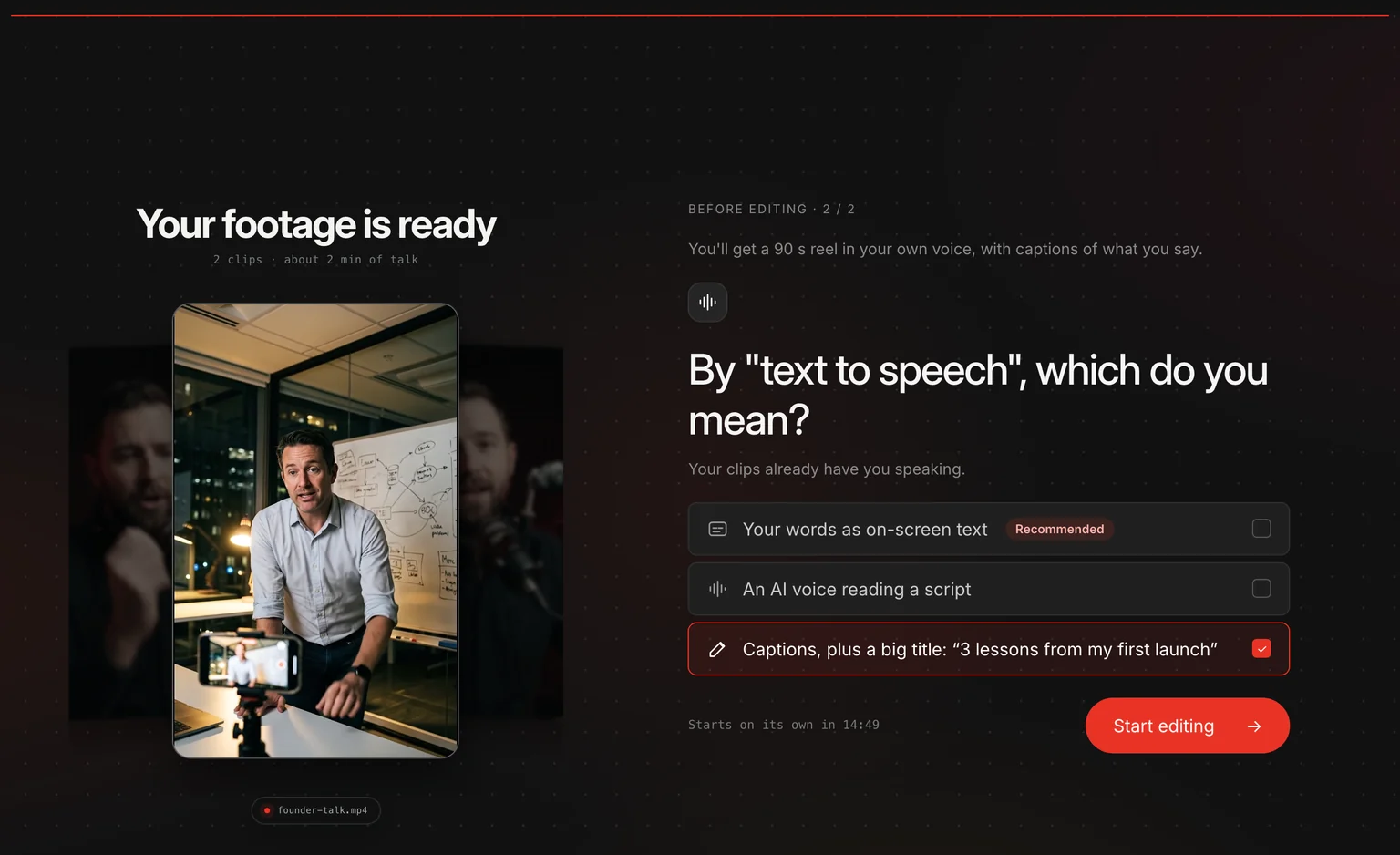
The worst guesses can’t be fixed with a small change. Ask for “text to speech” over a clip of yourself talking, and you might mean captions of your own words, or an AI voice reading a script. Guess the wrong one, cut five minutes of talk down to a 20-second teaser, and the fix is a whole new edit.
Questions That Fit Your Edit
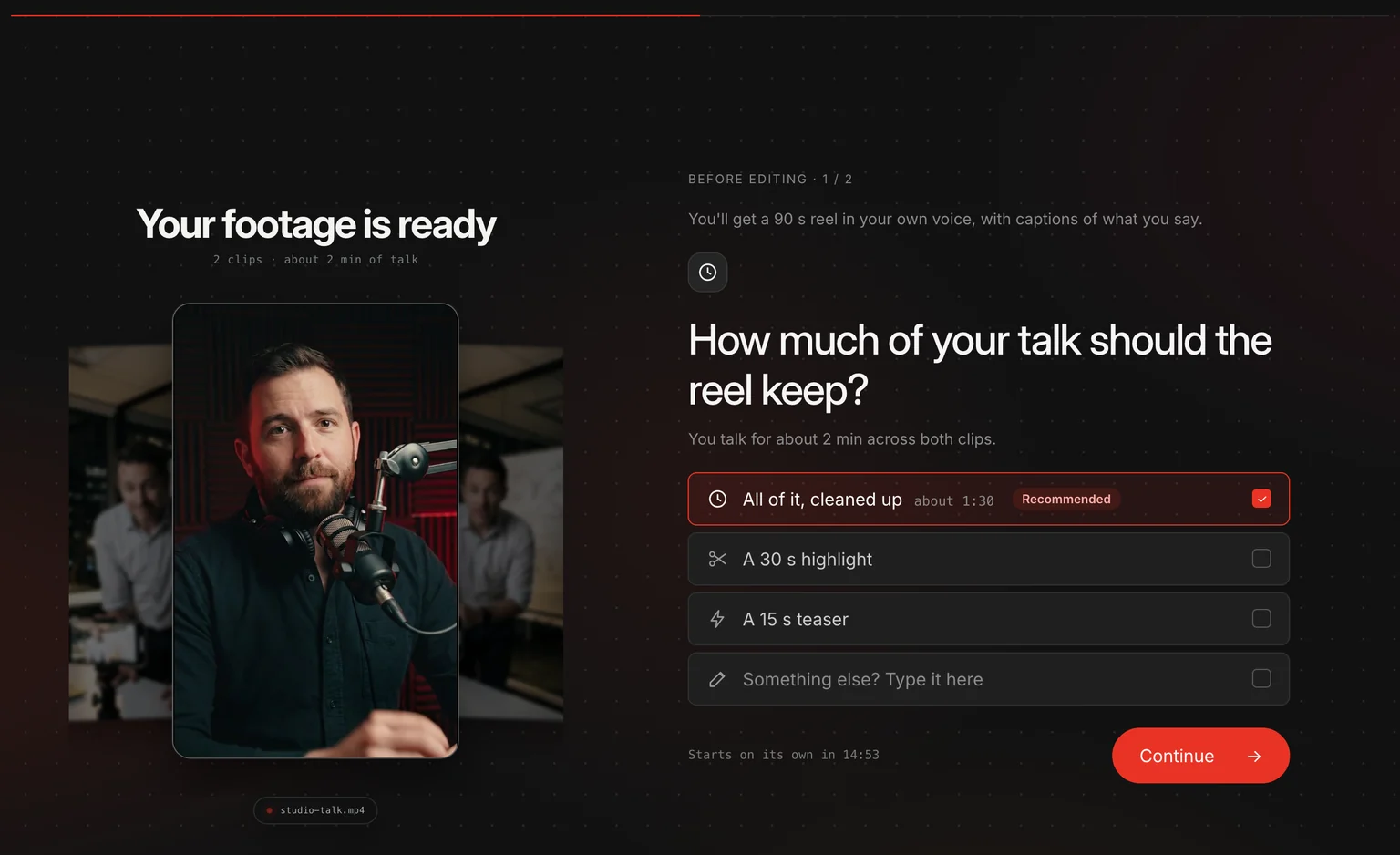
Shorty asks once your clips have uploaded and it has listened to every one of them, so the questions are about your video, not a form. It knows you talk for about two minutes across both clips, so it asks how much of that to keep, and tells you how long the full version would run.
The number of questions follows what your brief leaves open. A clear brief needs none; an ambiguous one may need several. Shorty asks one question per screen, with two to four answers each. The answer it recommends is already selected, so if it’s right, you just press Continue. If none of them fits, type your own under “Something else”, and Shorty edits to your words.
You have 15 minutes to answer, and you don’t have to answer at all: if you leave it, editing starts on its own with the recommended choices.
How do I answer?
Add your clips, write what you want and press Edit, the same as always. If Shorty needs to know something, the questions appear where the upload progress was. Pick an answer, press Continue, then Start editing.
What a Wrong Guess Costs
Here’s what it takes to fix one choice at each point, on Auto, the director most edits run on. Answering first is the only way that costs nothing.
| When you fix it | Your time | Waiting | Credits |
|---|---|---|---|
| Before editing: answer a question | A few seconds | None | None |
| After: ask for a revision | Watch the edit, find what’s off, explain it | About 4 minutes for a small change | Uses credits every time |
| After: start the edit again | Write the brief and add the clips again | About 15 to 22 minutes | About 500 on Auto, about $2.16 on Creator |
Revisions are still the right tool for taste: a different font, a tighter cut, a warmer look. They’re the wrong tool for a choice nobody made. Those now get settled before the edit, in a few seconds, for free.
What It Asks About
Length
Four in ten requests don’t say how long the video should be, and people sent edits back for being too short almost three times as often as too long. So when you upload more than a short reel’s worth, Shorty asks, with lengths that fit your footage, and suggests the longer one.
Sound
Your voice with quiet music under it, your voice alone, or music with the clips muted. Music was the second thing people fixed most.
Captions and on-screen text
As many people asked us to add captions as to take them off, so there’s no safe guess. Shorty suggests captions when someone speaks, and a clean frame when nobody does.
Your voice or an AI voice
Only when your own words could mean either, like “text to speech” or “voice over”. Requests turned an AI voice down seven times as often as they asked for one, so Shorty always suggests keeping yours.
Pace and order
Calm, balanced or fast when your brief only says “cinematic” or “dynamic”, and whether to keep your upload order when you add lots of clips.
Most Edits Won’t Ask Anything
Asking is the exception. If your brief already says what you want, Shorty starts editing straight away, as it always has. And it doesn’t ask about what you’ve already set: switch captions on or off, or attach a track, and that question is gone. A length you set is kept too, unless it can’t work, like a 30-second reel from 20 seconds of footage. Then Shorty asks, and keeping your length is always one of the answers.
It never asks about the craft, either. Cuts, transitions, fonts, colours and effects are Shorty’s job. The questions are only for the choices that are yours to make and expensive to get wrong.
Questions come on new edits. Revisions, and briefs you start several at a time, go straight to editing.
How do I skip the questions?
Say it in your brief, or set it in the composer. “A 30-second reel in my own voice, captions on” leaves nothing open.
Walked Away? It Waits, Then Goes Ahead
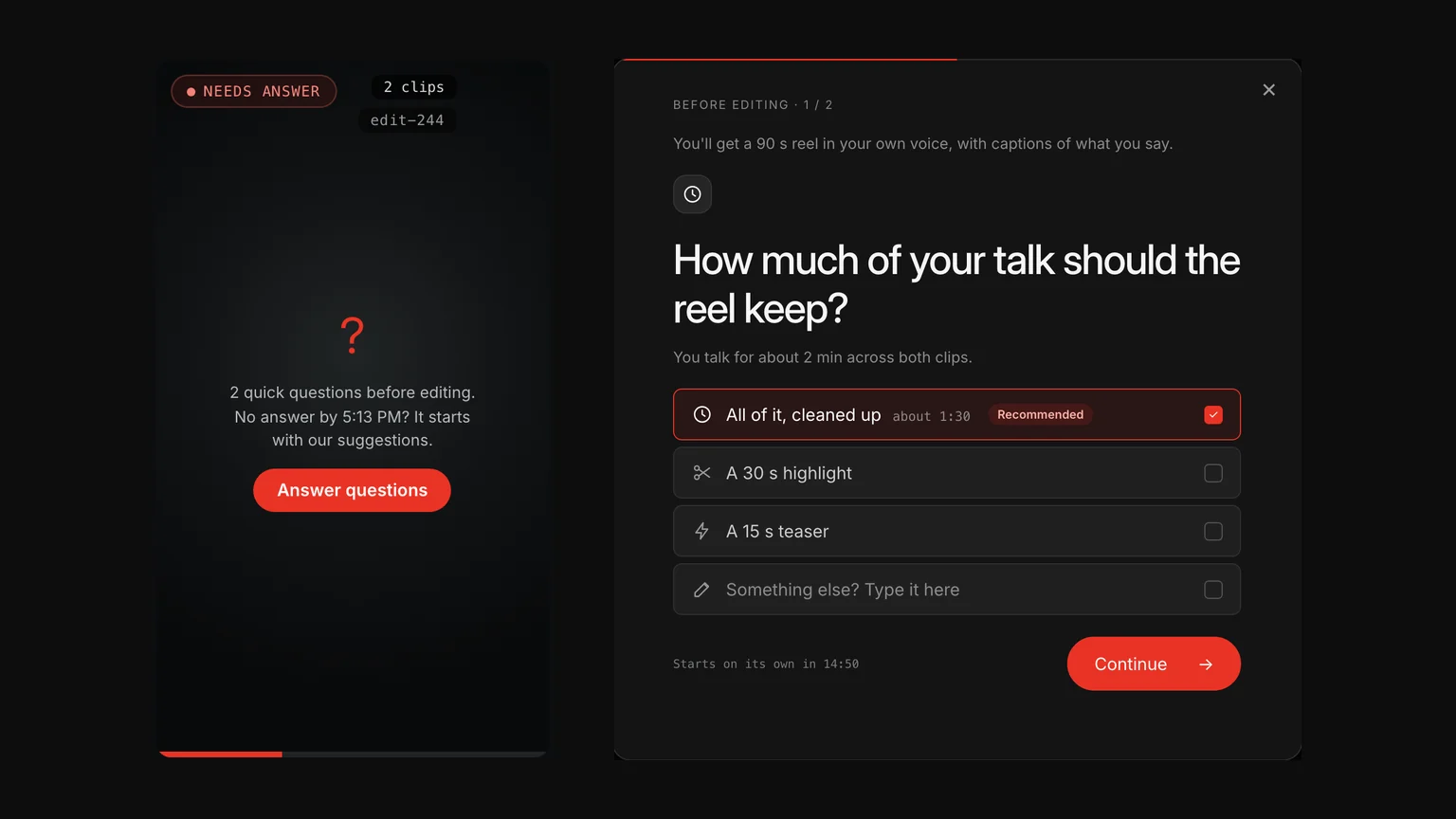
You don’t have to watch the upload. If you close the page before answering, the edit shows up in Edits as Needs answer, with the time it will start on its own. Press Answer questions to choose from the same answers there.
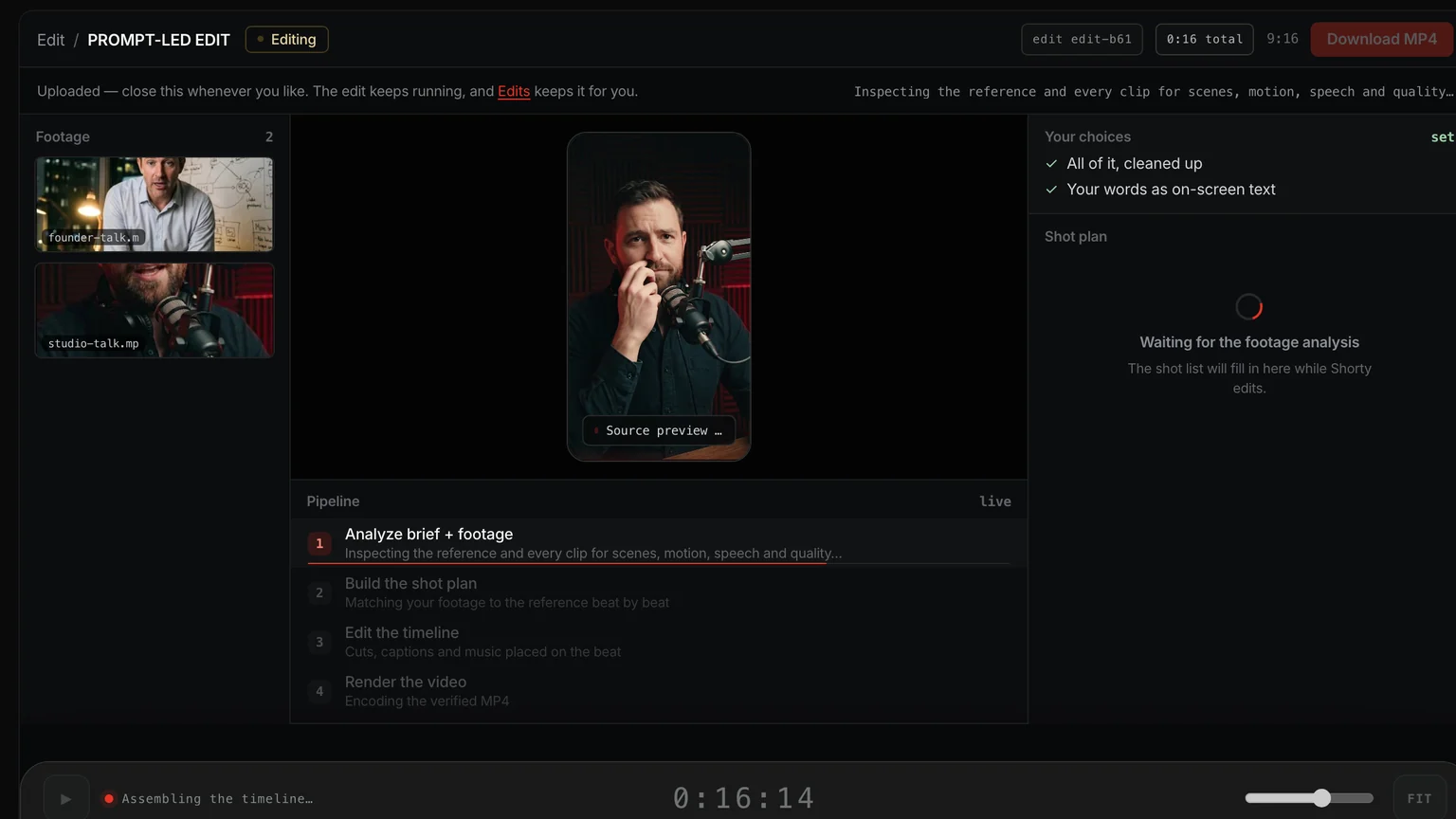
When the edit is ready, its page lists Your choices, so you can see what it started from. If you were away and it went ahead with the recommended choices, it says so, and you can change any of them in a revision.
Go Further
How to write a great prompt
Say the length, sound and captions up front and there’s nothing left to ask.
Every edit now costs half
What an edit costs on each plan, and why it’s ready sooner.
Plans and pricing
Every plan, the credits it includes and how many edits it makes.
Frequently Asked Questions
Does Shorty ask questions before it edits?
Sometimes, and only when it matters. When your brief leaves big choices open, like how long the video should be, what happens to the sound or whether you want captions, Shorty asks the multiple-choice questions needed to settle them after your clips upload and before editing starts. Its recommended answer is already picked, and you can always type your own. A clear brief needs no questions.
Do the questions cost credits?
No. Answering doesn’t use credits, and it takes only the few seconds you spend on it. What it saves you from, a revision or a whole new edit, is what costs credits.
What happens if I don’t answer?
The edit starts on its own after 15 minutes with Shorty’s recommended choices, and the finished edit says it used them. If you closed the page, the edit waits in Edits as Needs answer until then.
Why doesn’t Shorty ask me anything on some edits?
Because your brief or your settings already answered it. Shorty doesn’t ask about a captions setting or a music track you already chose, or about details it decides itself, like transitions, fonts and colours. A length you set is only questioned when it can’t work with your brief or your footage.
How do I get the edit I want on the first try from an AI video editor?
Say the choices only you can make: how long it should be, whether to keep your own voice, whether you want music, and captions or not. If you leave one out, Shorty now asks before it starts, so the first cut is built on your answer instead of a guess.
Can I change my answers later?
Yes. Every edit that asked lists the choices it started with. Ask for a revision to change any of them.
Two taps now instead of a redo later. Go make something.
The Shorty Team
Say it once. Get it right.
Add your clips, write what you want, and answer a quick question if Shorty has one. Your first cut starts from what you meant.
Start creating