
 Pricing
Most edits that disappoint don’t fail on the big idea. They fail on a wobbly shot, a voice lost under the wind, or a clip twice as loud as the one before it. Today’s update is about those basics: stabilization, clean sound, color, sharpness and 4K. Shorty now measures the shake and the sound in every clip you upload and fixes what needs fixing, whether or not your brief mentions it. The director grades with film looks or matches your reference’s color, rebuilds soft or small shots, 3D captions now speak Cyrillic and Arabic, and Auto has a new director that watches your footage itself.
Stabilization, Without Asking
Until now, the director steadied a shot when you asked for it, or when it spotted the shake in the frames it looked at. Still frames hide shake, so a lot of it slipped through.
Now Shorty measures how much the camera moves in every clip before the edit starts, and rates each one steady, mild, shaky or very shaky. Shaky shots are stabilized automatically, unless the shake is the point: a POV run, a raw vlog, a whip pan the cut depends on. The director picks the lightest strength that does the job and stays inside the part of the clip where that strength works in full, so it never crops in more than it has to.
In our test on six very shaky handheld clips, the finished edit came out about five times steadier than before, with no word about stabilization in the brief. That’s steadier than the earlier edits where stabilization was asked for by name.
Revisions measure it too. Say “it’s still shaky” and the director sees which shots measure shaky and which stabilized stretches didn’t hold, and redoes them.
Side by Side with CapCut
Shorty’s stabilizer now corrects perspective, the way CapCut’s does, so walking shots stop wobbling at the edges. A person or a car filling the frame can’t drag the correction along with it.
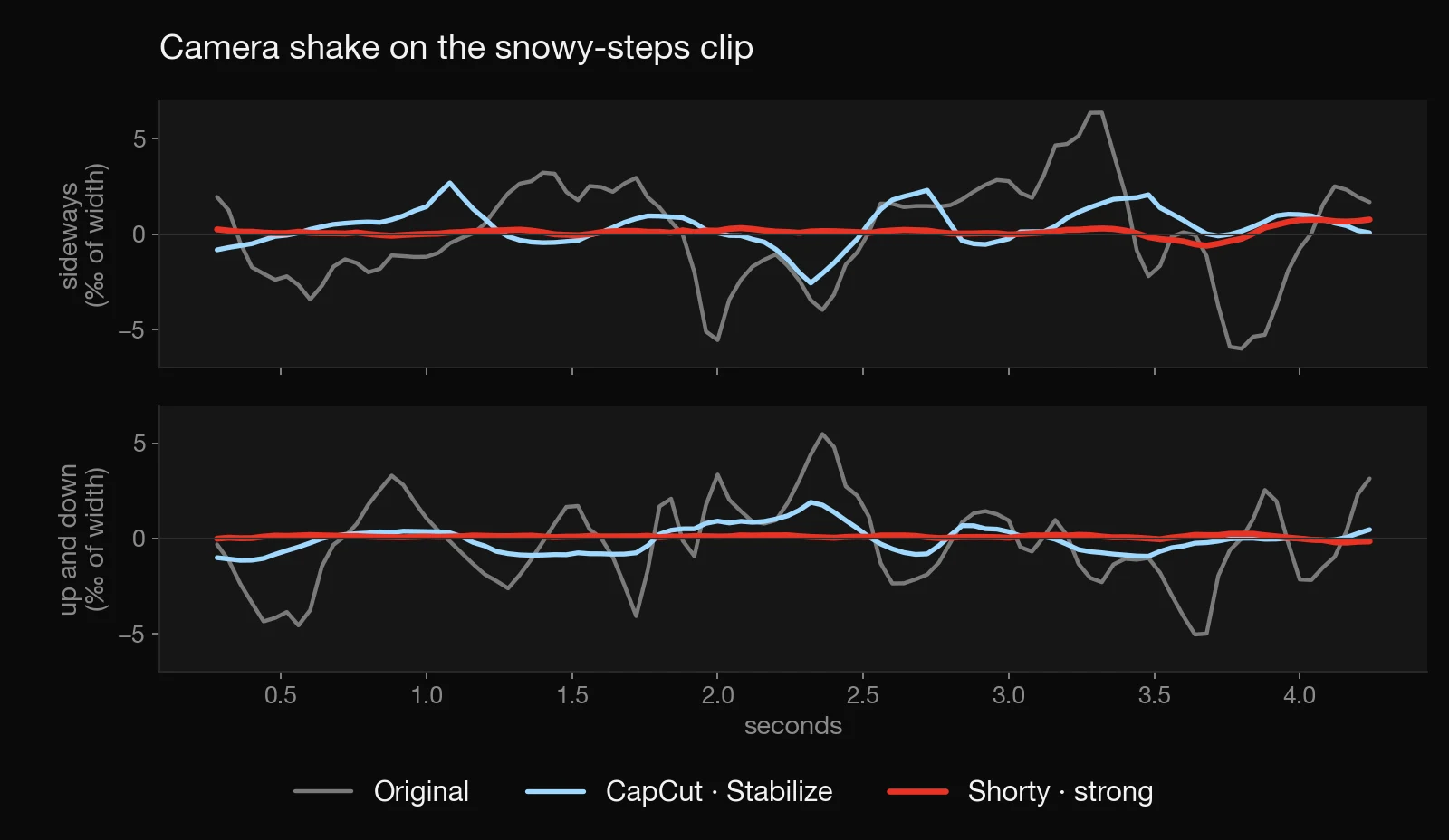
We ran three handheld clips through CapCut’s Stabilize and through Shorty at strong, then measured how much each result still shakes, with a measure independent of our own tracker. Shorty came out steadier on all three. On a night walk, 14.7 against CapCut’s 21.5, from 39.1 in the original. On a wide shot of snowy steps, 2.9 against 8.3. On a vertical ski clip, 4.8 against 5.4. Lower is steadier. Shorty never cropped in further than CapCut: 1.35× against 1.37×, 1.17× against 1.24× and 1.10× against 1.23×.
Clean Sound
The director can’t hear, so Shorty now measures the sound of every clip for it: how loud the voice is, how loud the room is between the words, and whether that background is steady, like a fan, a hum or traffic, or changing, like music, a crowd or wind.
When a voice sits too close to its background, the director cleans it up, keeping the speech and pulling down hiss, hum, fans, traffic, wind and echo, like Reduce noise in CapCut or Enhance Speech in Premiere. It checks that the voice itself came through unharmed before using the cleaned version. B-roll, music, applause and the crowd a moment is about keep their sound.
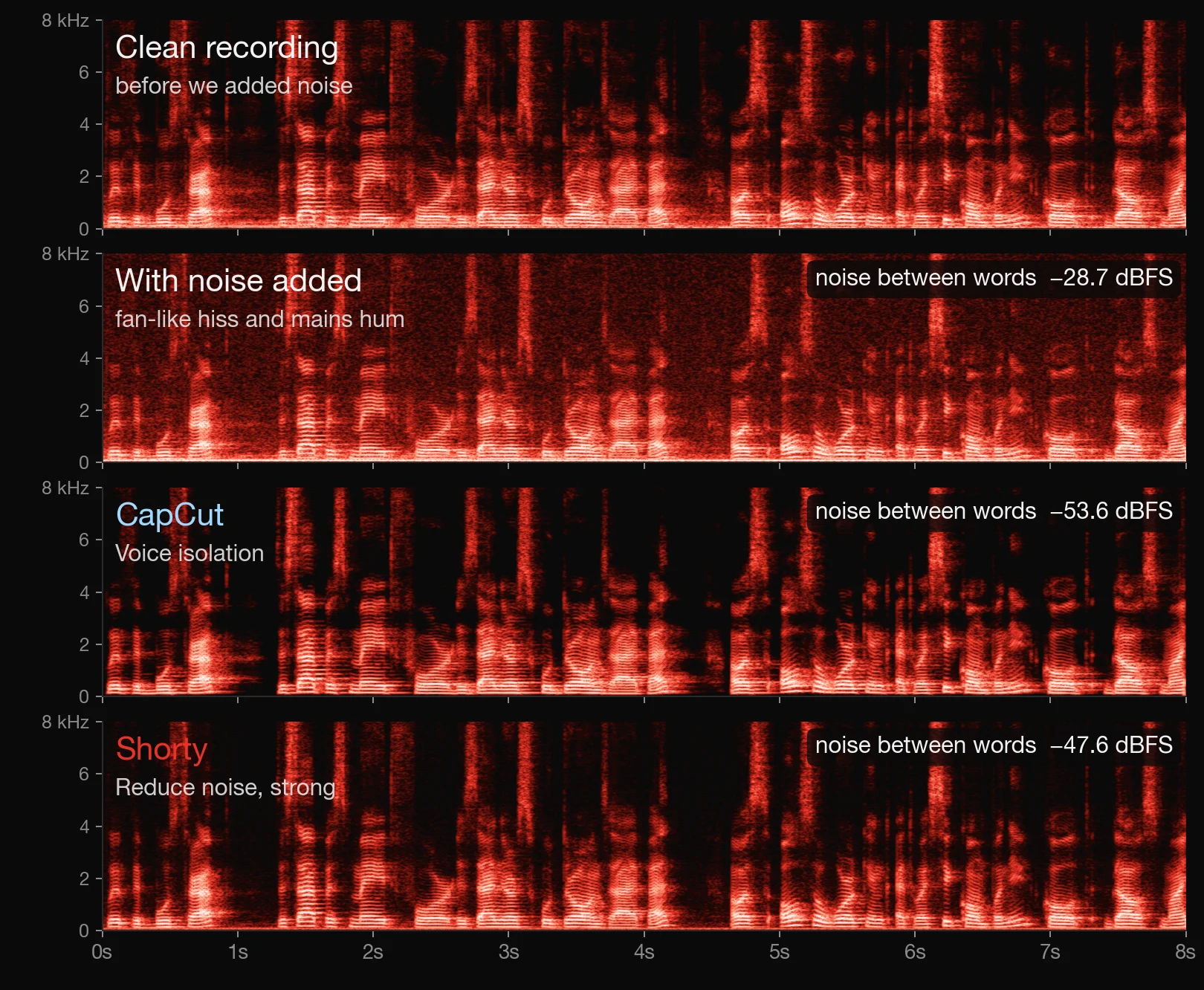
We added fan-like hiss and mains hum to a clean recording and ran it through CapCut’s Voice isolation and through Shorty. CapCut pulled the noise between words down further, to −53.6 dBFS against Shorty’s −47.6, from −28.7 with the noise added. That’s by design: Shorty always keeps a little of the room, because stripping it completely is what makes voices sound robotic. A speech recognizer heard exactly the same words in both cleaned versions.
Even Levels
Clips recorded at different distances now come out at the same level. The director evens the voices out before the mix, like Normalize loudness in CapCut or Match Loudness in Premiere, and keeps music well under the speech.
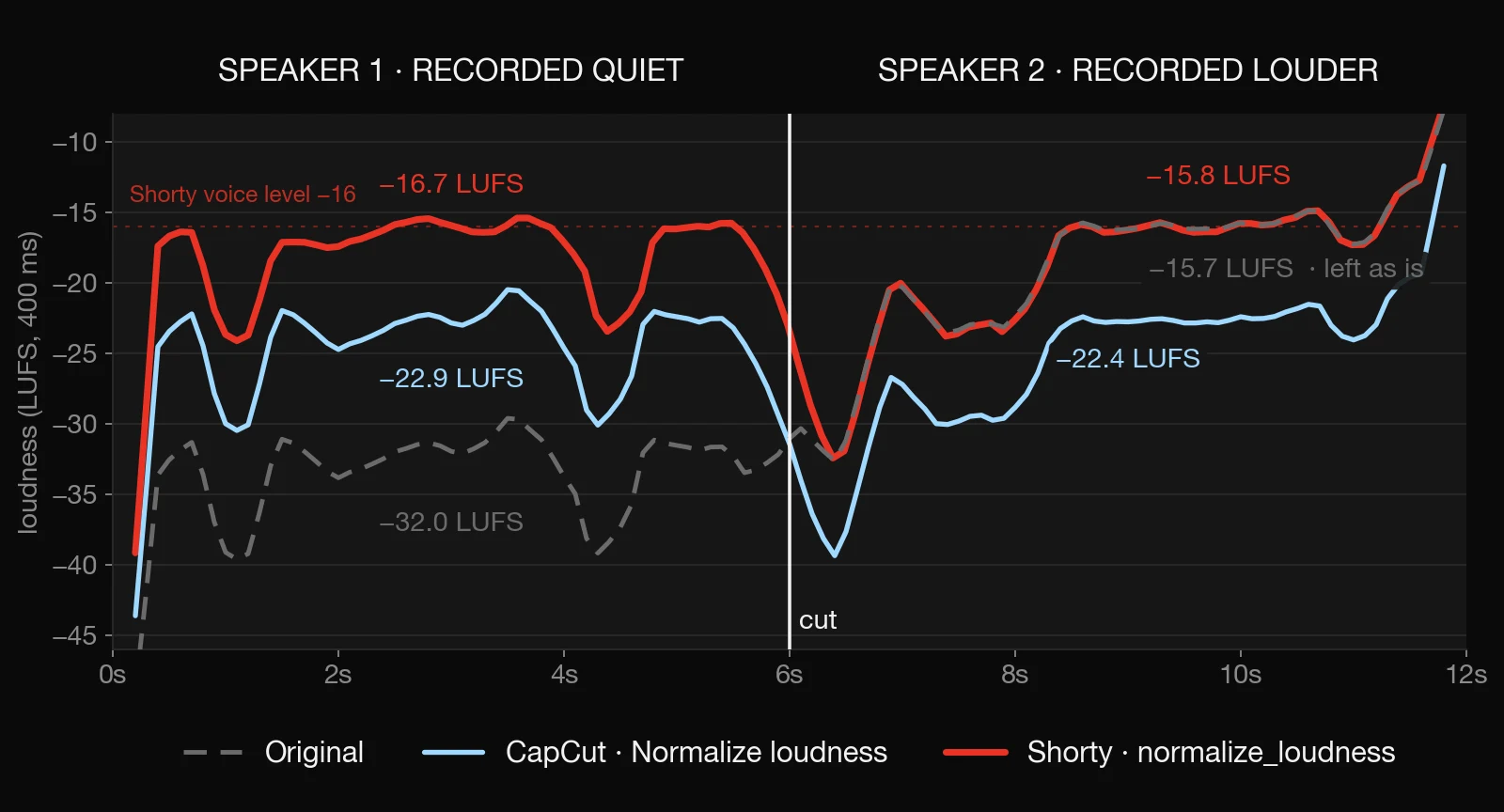
In our test, two speakers were recorded 16 LU apart, at −32.0 and −15.7 LUFS. Shorty raised the quiet one to −16.7 and left the other alone, since it was already at speaking level. CapCut’s Normalize loudness brought both to about −23 LUFS, its own target. Set to that same −23 target, Shorty put the two voices 0.02 LU apart, CapCut 0.5.
Then every finished edit gets one last check: if it plays quieter than −14 LUFS, the level most social and streaming apps play at, it is raised to it. A louder edit keeps its level and only has its peaks trimmed. You can ask in a revision too: “the volume jumps,” “there’s wind noise,” “I can’t understand her.”
Color Grading with 32 Film Looks
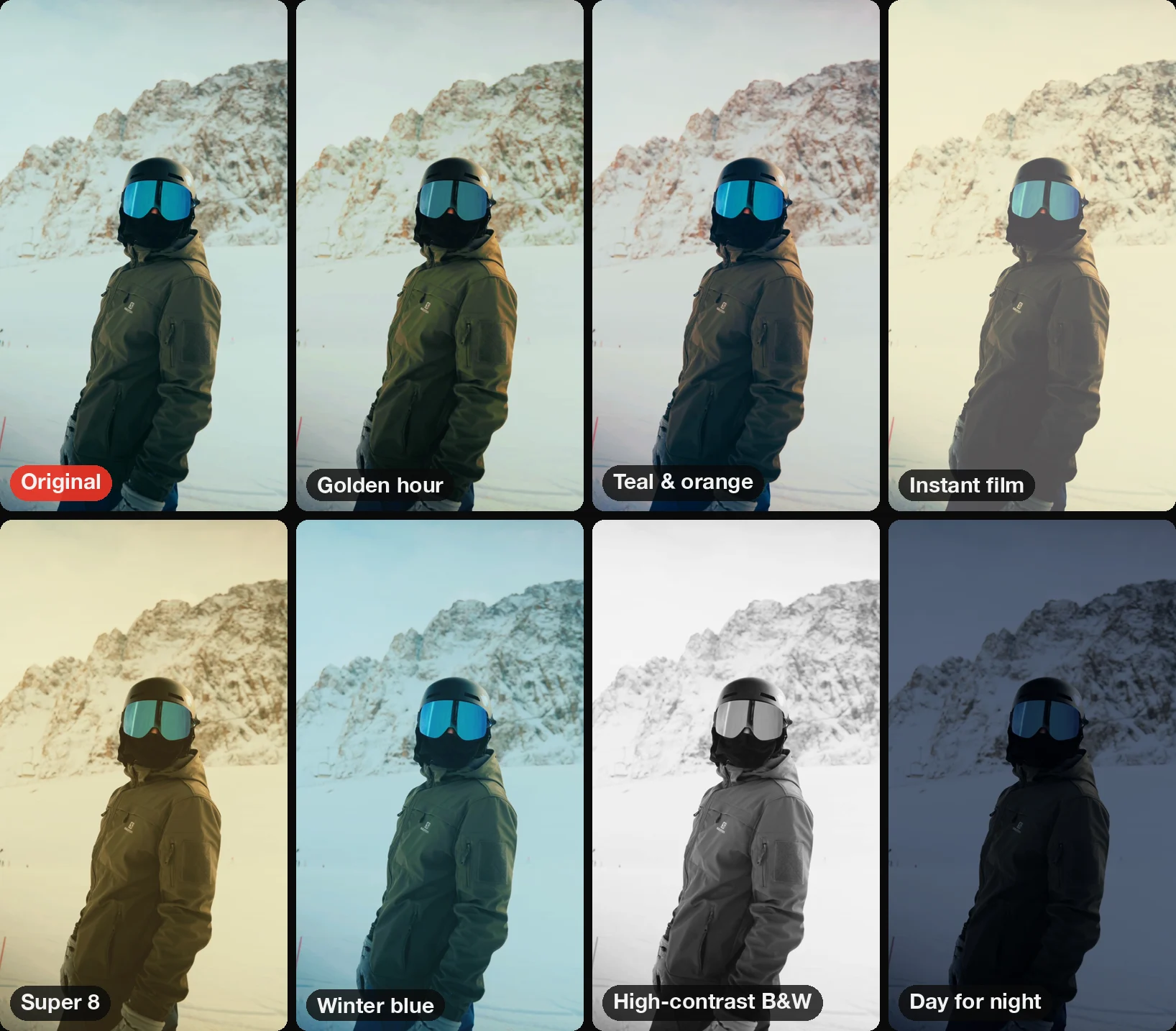
The director can grade with real film looks again: 32 of them, from film-stock emulations and Super 8 to instant film, teal and orange, winter blue, high-contrast black and white and day for night. Ask for a look in your brief, “warm 70s film” or “cold and moody,” and the director tries up to four of them on your own clip, compares them side by side, and picks the one that fits, at full or partial strength.
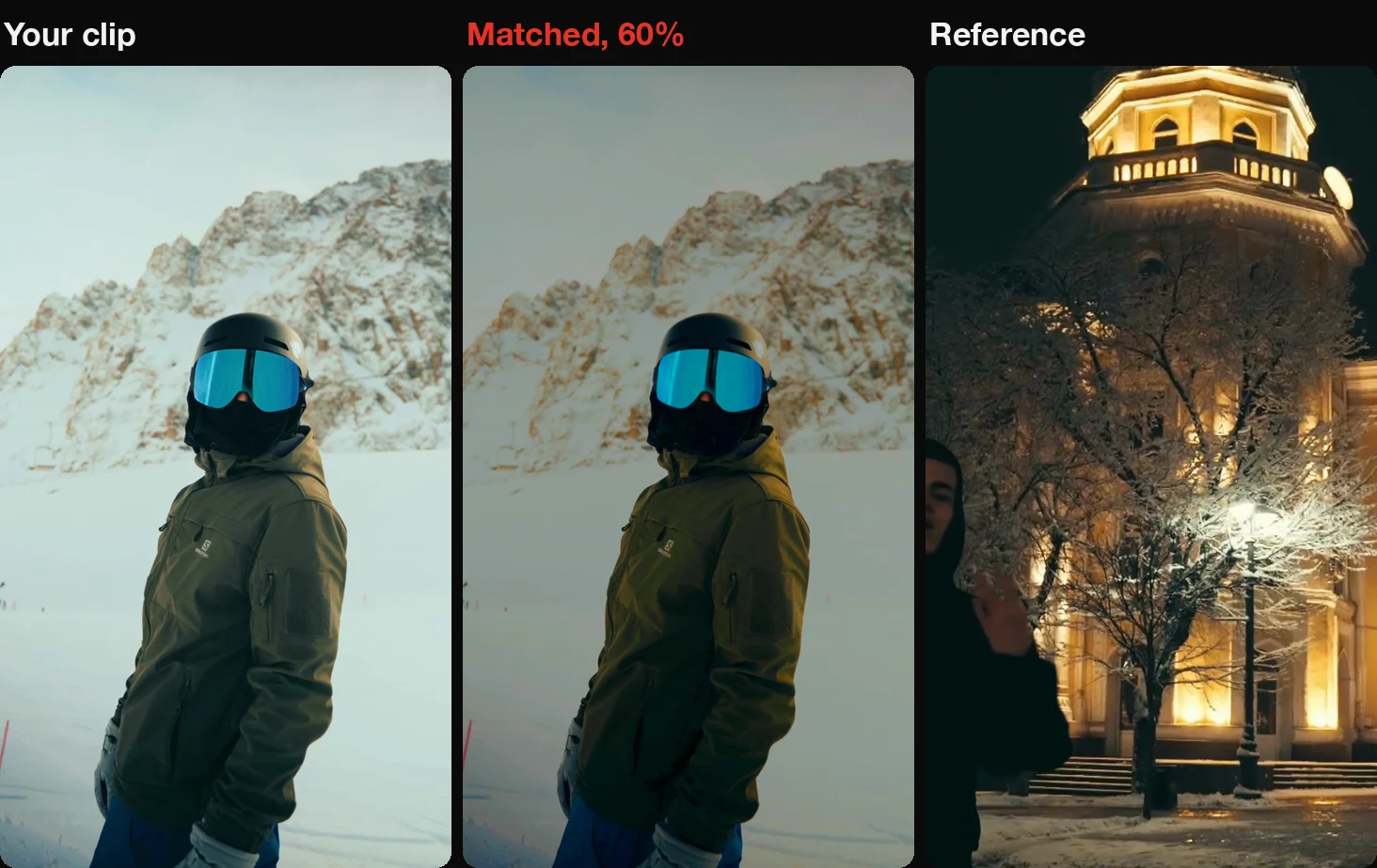
Got a reference with a color you love? The director now measures it, brightness, contrast, color cast and skin tones, and grades your clips to match. It fits one transform for the whole edit, so each shot keeps its place relative to the others instead of being flattened to one exposure, and skin keeps its natural hue. It can also take out a color cast with a proper white balance.
On a real six-clip edit graded to the creator’s own reference, the clips’ average brightness went from 111 to 96, against the reference’s 95, and their color landed within a point of it. A match is statistics, not taste, though: at full strength a hazy sky can turn grey. So the director looks at the result at more than one strength before it commits.
4K When You Ask for It
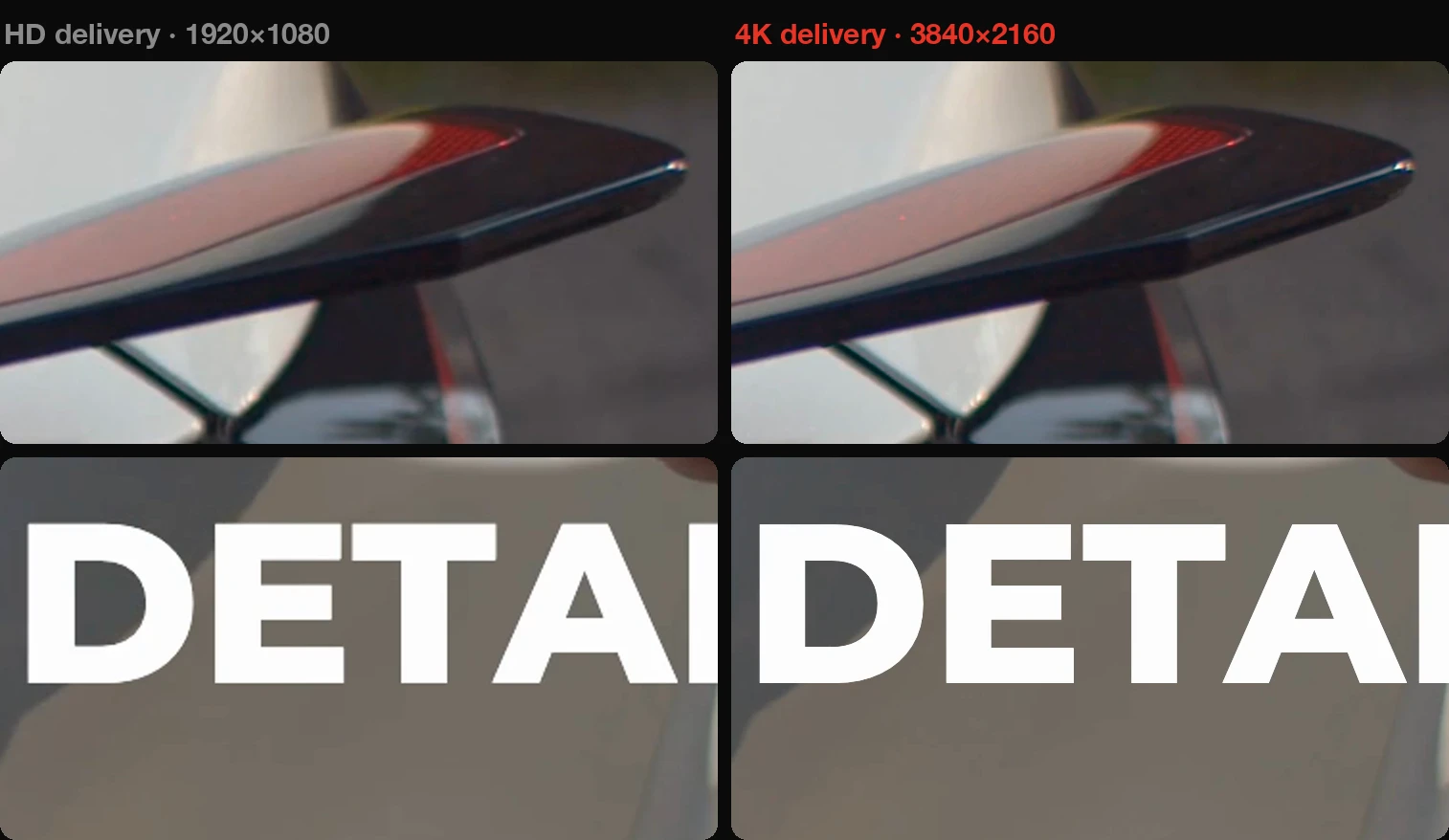
Write “4K” in your brief or a revision and your edit is delivered at 2160×3840 for vertical video or 3840×2160 for horizontal. It is rendered from your original uploads, not the HD copies Shorty edits with, and titles and captions are drawn at full 4K sharpness.
Already have a cut you like? Ask a revision to “make it 4K” and Shorty delivers the same edit again in 4K, without re-editing it. The plan summary confirms the size and tells you if any of your uploads are below 4K. Edits that don’t ask stay in HD, as before.
Upscaling and Restoring Soft Footage
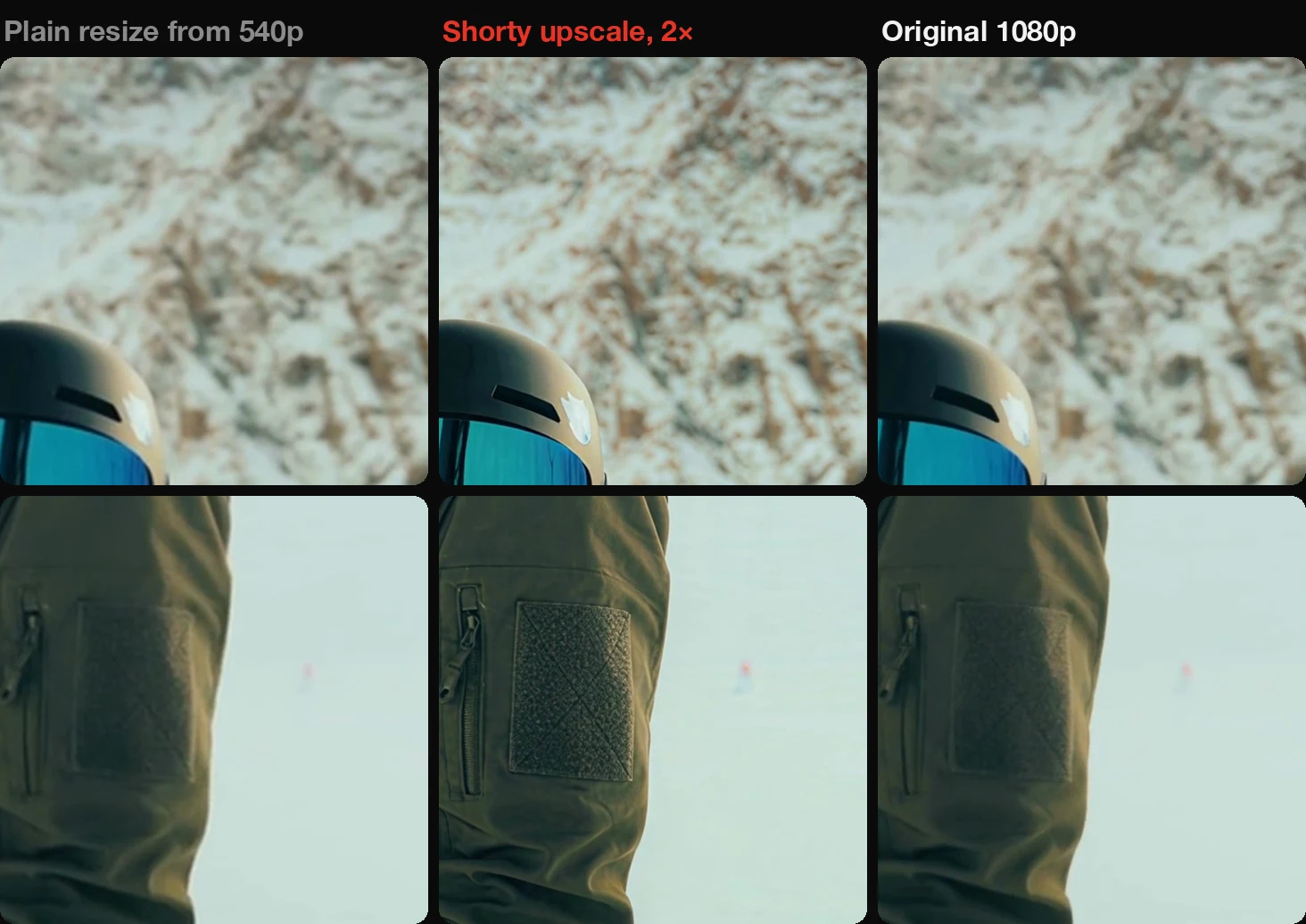
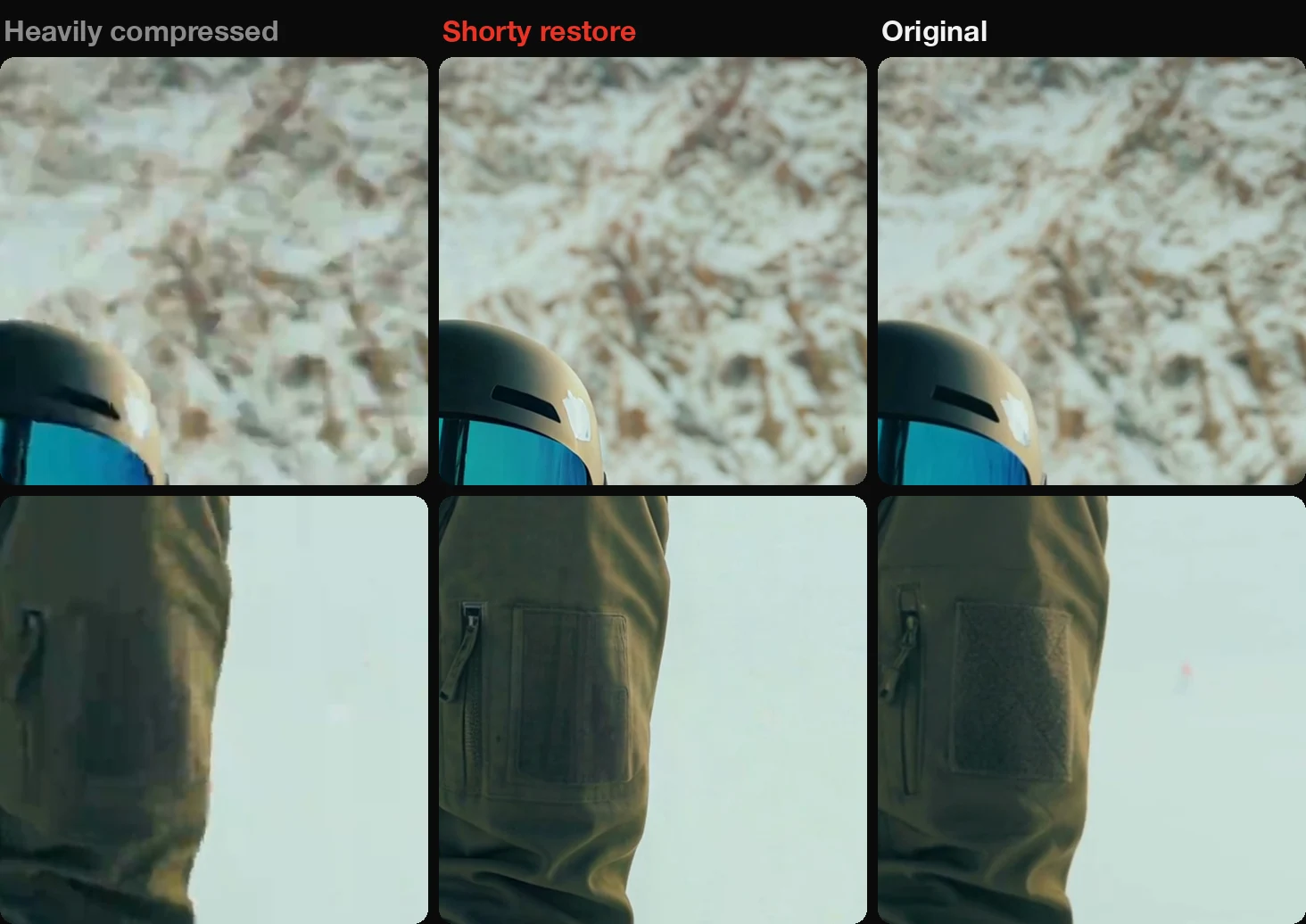
Shorty can now rebuild detail in footage that’s too small or too soft, with Topaz’s Starlight model. When a clip is smaller than your edit, or a punch-in would stretch it past its pixels, the director upscales that shot, up to four times. When a shot fills the frame but looks soft, blocky or noisy, the director restores it at the same size.
It does this only for the shots that need it, usually the ones your edit leans on, like a face, and it checks a before-and-after sheet of every result, so a changed face or word gets rejected. It leaves clean, sharp footage alone, along with tiny faces or text it would have to invent and heavy motion blur. You can ask in a revision too: “it’s blurry,” “make it HD.”
We shrank two seconds of our ski clip to 540×960 and asked Shorty for it back at 1080×1920. The upscale rebuilt the jacket’s weave and the rock texture that a plain resize smears. Restoring has a limit we want to be upfront about: on a copy we compressed into blocks, Shorty cleaned up the blocks, but texture the compression had already destroyed, like the patch on the sleeve, came back smoother than the original.
3D Captions in Cyrillic and Arabic
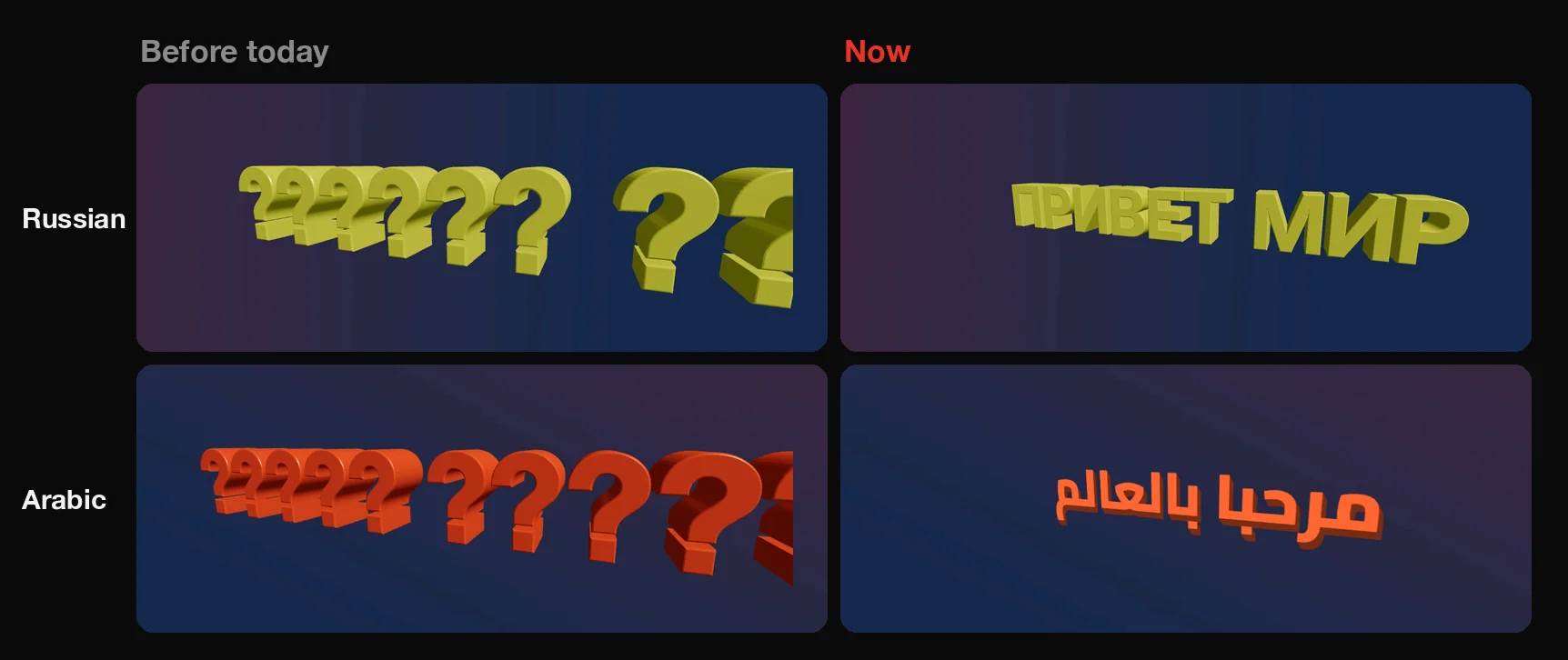
3D captions used to turn every Cyrillic and Arabic letter into a question mark. Now Russian, Kazakh, Ukrainian and every other Cyrillic alphabet, plus Greek and Vietnamese, come out as real extruded 3D letters.
Arabic, Chinese, Japanese, Korean and emoji can’t be extruded yet, so they appear as flat lettering set in the same 3D perspective, in the caption’s own font. And long tilted lines no longer run off the edge of the frame, in any language.
A New Director Behind Auto
Auto now hands your edit to GPT 6.1 Sol, which watches your clips itself. It looks at frames, listens to the audio and reads the transcript whenever it needs to, instead of working from a written summary of each clip. That covers edits of up to ten clips, as with every director you pick yourself.
We compared it with the previous Auto side by side on creators’ real edits. It pulled ahead most clearly on edits without a reference video: collages, talking heads and product ads. If Sol is unavailable, Auto passes your edit to another director automatically. Edits that were already running keep the director they started with, revisions included.
Also New
A reference’s soundtrack, more often
When your reference is a fashion film, a trending sound or a hype edit with a spoken line riding the music, Shorty can now score your edit with its soundtrack. References where someone on screen is talking still lend their style, not their audio.
Color requests that change the color
Ask a revision for warmer colors, a color correction or a new grade, and Shorty now checks that the picture’s color actually changed before it delivers.
Bigger uploads
Some edits with many long clips failed while Shorty prepared the footage. That’s fixed.
Open an edit in a new tab
Open on an edit now works like a link, so Cmd-click or middle-click opens it in its own tab. The opened cut shows its short ID, and a click copies it.
Add music in one click
On a cut you can revise, Add music opens the chat with a request for an original track in the genre and tempo the director planned. Read it, then send.
Recreate edits from your AI assistant
Edits made through Shorty MCP now have Recreate, and clips saved in another of your projects can be used again without uploading them a second time.
Good to know
Do I need to ask for stabilization or noise reduction?
No. Shorty measures every clip, and the director fixes the shots and voices that need it. If you want something specific, say it in your brief or a revision: “steady the walking shot,” “clean up the wind noise.”
Will Shorty steady a shot I want shaky?
Shake that is part of the shot, like a POV run, a raw vlog or a whip pan, is kept. To keep a particular shot as it is, say so: “keep the handheld feel on the opener.”
How do I get 4K?
Write “4K,” “UHD” or “2160p” in your brief, or ask a revision to “make it 4K.” Phrases like “shot in 4K” or “4K followers” aren’t read as a request.
Is every shot in a 4K edit true 4K?
Shots come from your original uploads, so they are as sharp as what you filmed. Uploads below 4K are scaled up, and so are stretches Shorty rebuilds itself, such as stabilized, slow-motion or restored shots, which are made at HD size.
Does upscaling cost extra?
Yes. Restoring or upscaling a shot is charged in credits by the second of video it makes, and only for the shots that get it, up to three per edit.
Can I ask for a look by name?
Yes. Name one in your brief or a revision, like “Super 8” or “day for night on the last shot,” or describe the feel you want and let the director choose from the 32.
Which languages work in 3D captions?
Latin, Cyrillic including Kazakh, Greek and Vietnamese render as 3D letters. Arabic, Chinese, Japanese, Korean and emoji render as flat lettering in 3D perspective.
Shoot it handheld, record it anywhere, and let Shorty sort out the shake and the sound.
The Shorty Team
Shoot it handheld. Shorty steadies it.
Add your clips and describe the edit. The director measures every shot and fixes the shake and the sound for you.
Start creating