
 Pricing
A good speed ramp feels like the shot is breathing: it rushes in, hangs in the air and snaps back out. Today Shorty’s director can do that inside a single shot, along with smooth slow motion, motion blur and steadier footage. You don’t set keyframes or pick presets. Describe the edit you want, and the director decides where each of these makes it better.
Speed Curves
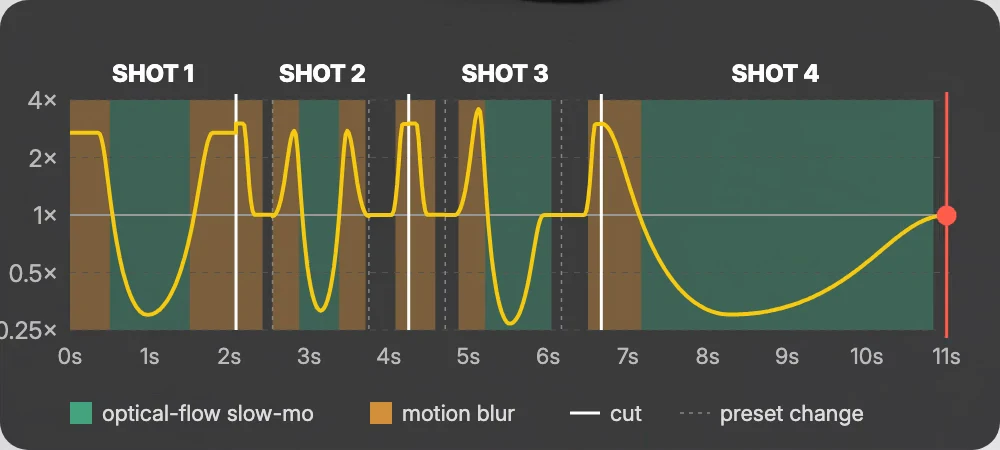
Until now, a shot played at one speed. Now the director can change a shot’s speed smoothly as it plays: fast into a moment, deep into slow motion, and back out again. It picks the curve from what each shot has to do, a trick, a reveal or a beat drop, and fits it exactly to the time the shot has in your edit.
You don’t need to know any of the vocabulary. Write “a hype reel of my snowboard trip” and the director decides which shots ramp and how. If you do have a move in mind, say it: “bullet time on the trick” works too. Speech never ramps, so people talking stay at their real speed.
The Curves Editors Use, Picked for You
Behind the scenes, the director works with the curves editors know by name: Montage, Hero, Bullet, Jump cut, Flash in and Flash out, plus landing and launch shapes that settle into a pose or leave one, and custom curves for everything else. It chooses one for each shot.
For music montages it can build a velocity edit, landing each key moment of your footage on a beat: slow on the hit, fast in between.
Smooth Slow Motion Inside the Curve
When a curve dips slower than your footage has frames for, the director fills the gap with optical flow, the same new in-between frames as our optical-flow slow motion. The slowest part of a ramp is now the smoothest, not the choppiest, without you asking for it.
Motion Blur on Every Speed-Up
Fast footage should smear the way it does through a real camera shutter. Every stretch that plays faster than real time now gets motion blur automatically, blended from the frames it rushes past, while slow motion and real-time stretches stay sharp. Want a more stylized whip? Say so in your brief.
Speed-ramp cuts are fast on both sides, too. The outgoing shot leaves at speed and the incoming one arrives at speed, both blurred, so the cut lands like a whip.
Steady Shaky Footage
Handheld clips no longer have to stay shaky. When a shot the director wants to use is shaky, it can steady that stretch first and cut with the steady version, so speed curves, slow motion, captions and cut-outs work on it as usual. You can also just point it out: “the walking shot is too shaky.”
The director picks the strength. Light and medium keep most of the frame. Strong smooths out bigger bumps and crops in a little more to hide the moving edges, never more than it needs. Footage that’s already steady is left as it is.
Good to know
Do I need to ask for speed ramps or stabilization?
No. Describe your edit and the director decides where ramps, slow motion, motion blur and steadier footage help. If you want something specific, say it in your brief or a revision, like “Hero on the trick” or “steady the walking shot.”
Do speed curves cost extra?
Planning a curve is free. Slow-motion frames made with optical flow are charged in credits, like any optical-flow slow motion.
Will every clip be stabilized?
Only the shots that need it, and only the stretch that’s used in your edit. Clips that are already steady are left alone.
Send the clips, describe the edit, and let the director handle the rest.
The Shorty Team
Describe it. Shorty edits it.
Add your clips, say what you want, and the director takes care of the ramps, the slow motion and the shaky shots.
Start creating