
 Pricing
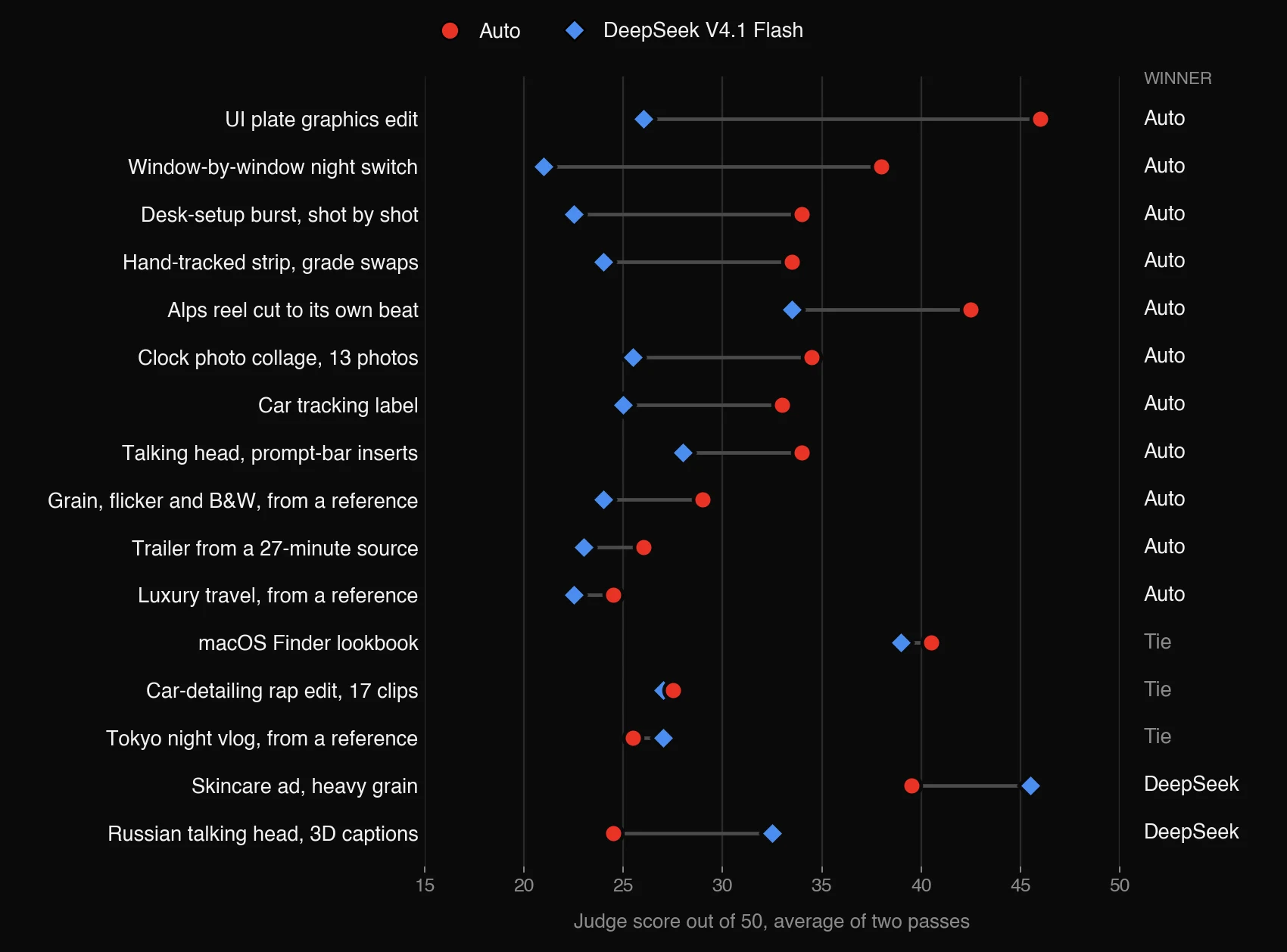
DeepSeek V4.1 Flash is one of the cheapest capable models you can call today. We wanted to know whether it could direct a Shorty edit, so we gave it 16 real edit requests next to Auto, with the same footage and the same brief, and put every pair side by side. Auto won 11, DeepSeek won 2 and 3 were too close to call. Here are all 16, so you can judge for yourself.
How We Tested
Every case is a real request made in Shorty: talking heads, ads, edits that copy a reference video, trend templates, and edits that need tools like tracking and masks. Both directors got the same clips, the same brief, the same reference, format and length.
Only the director changed. Auto is what you get when you leave the model on Auto, which today runs GPT-6.1 Sol. DeepSeek V4.1 Flash (the October 17 snapshot, at high reasoning effort) planned and wrote its edits on top of Shorty’s usual footage analysis. Everything else, from rendering to music, sound and every editing tool, was the same.
Gemini 4 Argon judged each pair without knowing which model made which edit. It saw the brief, the reference and both edits, scored them, and picked the one a creator would rather post. It judged every pair twice with the order swapped, and when the two passes disagreed we call it a tie. It also checked two to five must-haves and must-nots we wrote for each case, like “the bracket follows the car” or “no text over a face.” We also spot-checked the verdicts by watching the edits ourselves.
Each video carries a badge in its top right corner, so you always know which director made it.
The Results
Auto won 11 of the 16 cases, DeepSeek won 2, and 3 were ties. Auto also failed fewer of our checks: 8 against DeepSeek’s 19.
DeepSeek is much cheaper to run. Its director cost about a seventh of Auto’s per edit. It wasn’t faster, though. It took twice as many steps to finish an edit, 37 on average against Auto’s 18, rendering and revising more often, and its edits took 32 minutes on average against Auto’s 23 on the same machine.
Talking Heads
One case for each side. Auto handled the long rulebook better; DeepSeek wrote livelier 3D captions.
Talking head with typed prompt bars
Eight talking-head clips played in full and in order, three typed “prompt bar” inserts between them, one caption track in red, never more than two words on screen.
Winner: AutoAuto put all three prompt bars between the right clips and used red to land the punchlines. DeepSeek ran two prompt bars back to back, skipped the third, and made every caption white. Auto isn’t flawless either: one caption shows three words, and one 3D word sits on a face instead of behind it.
Russian talking head with 3D captions
Cut a Russian talking head so it makes sense, add 3D captions, and tuck some of them behind the speaker.
Winner: DeepSeek V4.1 FlashDeepSeek kept the opening hook, captioned every line in 3D with word-by-word highlights, and hid captions behind the speaker several times. Auto left stretches of speech uncaptioned and only went 3D at the end. Both put white captions over a white shirt. One caveat: DeepSeek’s captions in this test were written by Gemini, see the questions below.
Ads and Trends
DeepSeek’s other win came here, on a texture-heavy beauty ad. Two of these were ties, and Auto took the photo collage and the Alps reel.
Skincare ad with heavy film grain
A 7-second beauty ad from one clip: heavy film grain, flicker, black-and-white bursts and double exposures, no zoom pops, no text, ending on the product.
Winner: DeepSeek V4.1 FlashBoth followed the structure. DeepSeek’s grain and flicker are obvious at a glance, as the brief asked. Auto’s look stayed clean, and it showed the final product shot twice.
Car-detailing rap edit from 17 clips
Seventeen car-detailing clips cut like a rap video, with the name “8 Mile” in cursive, glitches and mask transitions.
TieThe two passes split. DeepSeek chose a hip-hop beat that fits the brief. Auto chose an electronic track, but did real mask transitions and a cleaner end title.
macOS Finder lookbook
A dark macOS Finder interface over a model walking in: folders, a cursor that opens them and outfits dragged into a lookbook, all timed to the second.
TieBoth got the layout and the timing right. Auto’s interface details and exit animation are neater. DeepSeek added the clicks and whooshes and the darker grade the brief asked for.
Photo collage around a clock
Thirteen photos scattered around a hand-drawn clock in the reference’s chaotic layout, with no borders.
Winner: AutoAuto copied the reference’s wobbly hand-drawn clock and pop-in entrances, and ran the hand through a full turn. DeepSeek drew a clean geometric clock that stops at eleven and faded the photos in.
Alps reel cut to its own beat
Ten seconds of the Alps cut to the clip’s own soundtrack, with two-word titles and text tucked behind the hiker or the mountain.
Winner: AutoAuto passed every check, with a clean circular mask between shots. DeepSeek put “THE ALPS” across the hiker’s eye in the opening close-up, and its circle reveal opens on a flat beige background.
Edits That Copy a Reference
Copying a reference means watching it closely and then finding the matching moments in your own footage. This is where the gap was most consistent: Auto won four of these five.
Luxury travel edit from a reference
A premium travel edit in the style of a reference that layers picture-in-picture frames.
Winner: AutoAuto picked up the reference’s layered frames and never repeated a shot. DeepSeek strung the clips together plainly and repeated the opening skyline at the end.
Desk-setup burst, shot by shot
A shot-by-shot remake: one long locked-off opener, then about eleven shots in three seconds, a warm amber grade, and a bookend on an empty chair.
Winner: AutoAuto followed the shot list, the contrast between the long opener and the burst, and the warm grade. DeepSeek cut the opener early, used six slower shots instead of eleven fast ones, and left cool grey shadows.
Grain, flicker and black-and-white from a reference
The same dynamic style as a reference: fast flashes, b-roll between shots, grain, flicker and black-and-white.
Winner: AutoNeither added the fast b-roll flashes. Auto kept the crisp studio look with sharp white flashes. DeepSeek laid a washed-out, blurry vignette over the whole edit.
Tokyo night vlog from a reference
A night vlog in a reference’s neon style, but punchier: cuts on the beat, speed ramps and flashes.
TieDeepSeek delivered the energy but keeps repeating the same few shots. Auto avoids repeats but stays slow. Each judge pass picked a different winner.
A trailer from a 27-minute video
One 27-minute video, a reference, and a four-word brief: “Use the reference editing style.”
Winner: AutoAuto matched the reference’s music, voice-over hook and trailer pace. DeepSeek used an unrelated beat and a washed-out filter and repeated clips, though it did add the kinetic captions Auto left out.
Tracking, Masks and Graphics
These cases need a tool used precisely: an object tracker, a mask per window, a graphic placed at an exact time. Auto won all four, and these were the biggest gaps in the test.
Tracking label on a moving car
Track the blue sports car, write “SHORTY TRACKING” above it and keep a bracket around the whole car.
Winner: AutoAuto’s label and bracket follow the car smoothly through one continuous shot. DeepSeek added a second shot in which the bracket disappears and the label stops following the car.
Strip pinned between the hands
A trend remake: a strip pinned between the hands, with thermal and inverted grades swapping inside it.
Winner: AutoAuto tracked the strip for the whole clip and swapped real thermal, inverted and acid-green grades. DeepSeek used flat color tints and dropped the effect for the last two seconds.
Graphics edit at an exact time
Add a UI plate from 0:16 to 0:19 of an existing video, rename one label and turn the green interface red.
Winner: AutoAuto made the change inside the full 30-second video, with the reference’s exit animation. DeepSeek returned only the three-second plate and left out the rest of the video.
Windows switching from day to night
Mask every window of a building separately, then switch them from day to night one after another.
Winner: AutoAuto masked the windows one by one and lit them in sequence. DeepSeek faded the whole building to night with one soft wipe.
What We Learned
DeepSeek is good at doing exactly what it’s told when it can do it in code: heavier grain, a full set of 3D captions, word-by-word highlights. It was weaker whenever the job meant looking closely at the footage or using a tool precisely: choosing shots, matching a reference’s timing, tracking an object, masking each window.
It also needed more tries. It rendered previews and rewrote its edit more often, so it was slower overall even though each step was quick.
Auto stays on GPT-6.1 Sol. We’ll keep running new models through the same set of real edits as they come out, and post what we find.
Questions
Can I pick DeepSeek in Shorty?
No. Auto runs the director that wins tests like this one, and Pro plans can choose from the directors in the model menu.
Why not use the cheaper model?
Because the edits were worse in 11 of 16 cases. An edit you have to redo isn’t cheaper.
Was the test fair to DeepSeek?
Both directors got the same inputs and the same tools, and the judge didn’t know which model made which edit. We fixed two problems on our side that only DeepSeek ran into. At high effort it spent all of the space our caption steps allow on thinking and returned no captions, so in this test Gemini 3.8 Flash wrote the captions in DeepSeek’s edits. One of its edits also hit a bug in our render checks, which we’re fixing, so we judged its second run.
Who made the footage?
Our team and creators who work with us. We left out every case that used a customer’s footage.
Same footage, same brief, two directors. We’ll keep testing, and Auto will keep running whichever one cuts better.
The Shorty Team
Leave it on Auto.
Add your clips and describe the edit. Auto runs the director that won this test.
Start creating